Choosing the right TV wall mount can make a huge difference in your viewing experience, room appearance, and overall comfort. While all mounts serve the same basic purpose — attaching your television securely to the wall — not all mounts are the same.
The three main types of TV wall mounts are:
- Fixed Wall Mounts
- Tilt Wall Mounts
- Full-Motion (Articulating) Wall Mounts
Each type has its own advantages, limitations, and ideal use cases. In this complete guide, you’ll learn exactly how they work, when to use them, and which one is best for your home.
Why Understanding Wall Mount Types Matters
Many people buy a mount based only on price, but choosing the wrong type can cause problems like:
- Poor viewing angles
- Screen glare
- Limited movement
- Difficult cable access
- Neck strain from improper height
Understanding mount types helps you:
✅ Improve comfort
✅ Reduce glare
✅ Maximize space
✅ Create a cleaner setup
✅ Avoid wasting money
1. Fixed TV Wall Mount
A fixed wall mount is the simplest and most common type. It holds your TV flat against the wall without any movement or adjustment after installation.
Think of it like hanging a picture frame — once mounted, it stays in one position.
Key Features
- Ultra-slim profile (closest to the wall)
- No tilt or swivel movement
- Strong and stable design
- Affordable pricing
- Easy installation
Advantages of Fixed Mounts
1. Clean, Modern Look
Fixed mounts keep the TV very close to the wall, creating a sleek, minimalist appearance that many homeowners prefer.
2. Strong and Secure
Because there are no moving arms or joints, fixed mounts are often the most stable and durable option.
3. Budget-Friendly
They are usually the cheapest mount type, making them perfect for budget setups.
4. Easy Installation
Fewer moving parts means faster and simpler installation compared to other mounts.
Disadvantages of Fixed Mounts
- No adjustment after installation
- Difficult to access cables behind the TV
- Not ideal for high wall placement
- Cannot reduce glare
Best Situations for Fixed Mounts
Fixed mounts work best when:
✔ TV is mounted at eye level
✔ Seating position is directly in front
✔ Room lighting does not cause glare
✔ You want a slim, flush appearance
They are commonly used in:
- Living rooms
- Bedrooms
- Offices
- Apartments
- Hotel rooms
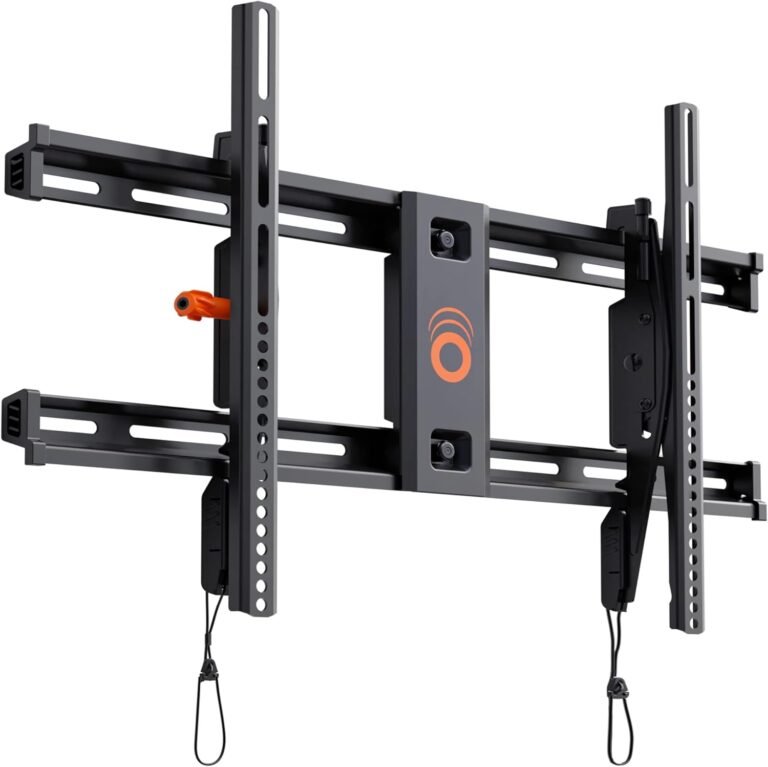
2. Tilt TV Wall Mount
A tilt wall mount allows the TV to move vertically (up and down angle). This adjustment helps reduce glare and improves viewing when the TV is mounted higher than eye level.
Tilt mounts are a great middle-ground option between fixed and full-motion mounts.
Key Features
- Vertical tilt adjustment (usually 5°–15°)
- Slim profile (slightly farther from wall than fixed)
- Affordable pricing
- Improved viewing comfort
Advantages of Tilt Mounts
1. Reduces Screen Glare
Tilting the screen downward helps minimize reflections from lights and windows.
2. Better for High Mounting Positions
If your TV is mounted above a fireplace or higher on the wall, tilt functionality improves viewing comfort.
3. Still Affordable
Tilt mounts cost slightly more than fixed mounts but remain budget-friendly.
4. Easier Cable Access
The ability to tilt the TV provides better access to ports and cables behind it.
Disadvantages of Tilt Mounts
- No side-to-side movement
- Limited adjustment range
- Slightly thicker profile than fixed mounts
Best Situations for Tilt Mounts
Tilt mounts are ideal when:
✔ TV is mounted above eye level
✔ There is glare from windows or lighting
✔ You want better viewing angles without paying for full motion
Common locations include:
- Above fireplaces
- Bedrooms
- Waiting rooms
- Offices
- Kitchens
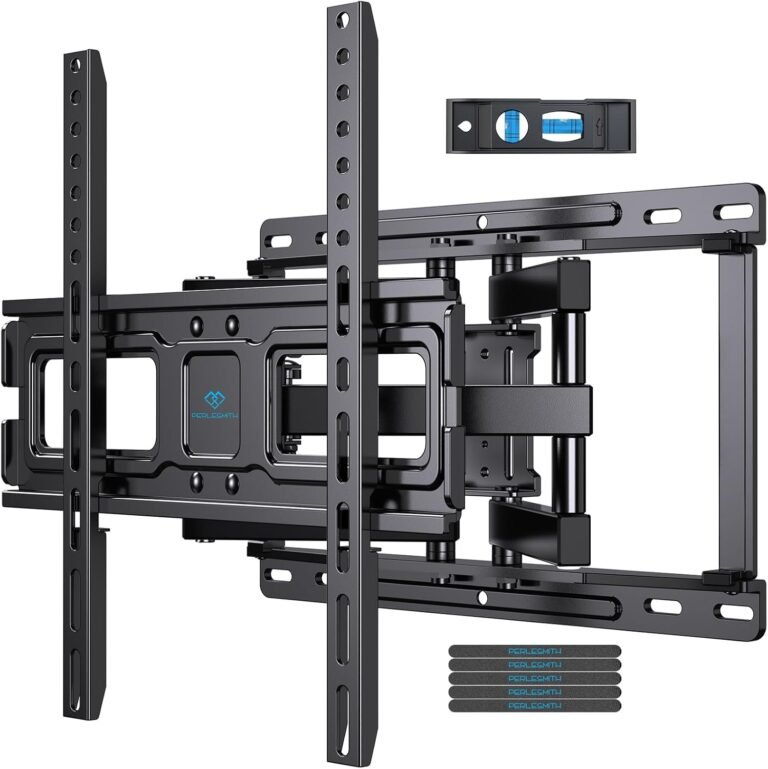
3. Full-Motion (Articulating) TV Wall Mount
A full-motion wall mount is the most flexible and advanced type. It allows the TV to extend outward, swivel left and right, tilt up and down, and sometimes rotate.
This mount uses a mechanical arm that moves in multiple directions.
Key Features
- Extends away from the wall
- Swivels left and right
- Tilts up and down
- Maximum viewing flexibility
- Supports corner installation
Advantages of Full-Motion Mounts
1. Maximum Viewing Angles
You can adjust the TV position to face different seating areas, making it perfect for large rooms.
2. Perfect for Corner Mounting
Full-motion mounts allow TVs to be installed in corners while still facing the room.
3. Easy Cable Access
Pulling the TV away from the wall makes connecting cables simple.
4. Ideal for Multi-Purpose Rooms
If you watch TV from different positions (sofa, dining table, bed), full motion is the best option.
5. Glare Reduction
Tilt and swivel adjustments help eliminate reflections.
Disadvantages of Full-Motion Mounts
- More expensive
- More complex installation
- Slightly less slim appearance
- Requires stronger wall support
Best Situations for Full-Motion Mounts
Full-motion mounts are perfect when:
✔ You need flexibility
✔ TV is in a corner
✔ Seating positions vary
✔ Room layout is complex
✔ You want premium comfort
Common locations:
- Living rooms
- Gaming rooms
- Open-concept homes
- Commercial spaces
- Bars and restaurants
Fixed vs Tilt vs Full Motion — Comparison Table
| Feature | Fixed | Tilt | Full Motion |
|---|---|---|---|
| Movement | None | Up/Down | Full range |
| Distance from Wall | Very close | Close | Extends outward |
| Price | Lowest | Medium | Highest |
| Installation Difficulty | Easy | Medium | Hard |
| Glare Reduction | No | Yes | Yes |
| Cable Access | Hard | Medium | Easy |
| Best For | Eye-level viewing | Higher placement | Flexible viewing |
Which TV Wall Mount Type Is Best?
The best mount depends on your room, viewing habits, and budget.
Choose Fixed Mount If:
- TV is at eye level
- You want the cheapest option
- You prefer a slim appearance
- Seating is directly in front
Choose Tilt Mount If:
- TV is mounted higher than eye level
- You have glare problems
- You want affordable adjustment
Choose Full Motion Mount If:
- You want maximum flexibility
- Room has multiple viewing areas
- TV is mounted in a corner
- You want premium comfort
Important Factors to Consider Before Buying
Regardless of mount type, you must check these factors:
1. TV Size Compatibility
Always match the mount with your TV size range (example: 32–65 inches).
2. Weight Capacity
The mount must support more weight than your TV.
3. VESA Pattern
VESA refers to the mounting hole spacing on the back of your TV (example: 400 × 400 mm).
4. Wall Type
Common wall types:
- Drywall with studs
- Concrete
- Brick
- Wood paneling
Stud mounting is the safest option for heavy TVs.
Common Mistakes When Choosing a Mount
Many beginners make these mistakes:
❌ Buying based only on price
❌ Ignoring weight limits
❌ Choosing wrong size
❌ Mounting too high
❌ Not considering viewing angle
❌ Forgetting cable access
Avoiding these mistakes saves time, money, and frustration.
Are Expensive Mounts Worth It?
Not always.
For many homes:
- Fixed mounts provide excellent value
- Tilt mounts offer the best balance
- Full-motion mounts are worth it for flexibility
The right choice depends more on your needs than your budget.
Professional Installation vs DIY
Most mounts can be installed at home using basic tools:
- Drill
- Stud finder
- Level
- Screwdriver
- Measuring tape
Installation typically takes 30–60 minutes.
However, professional installation may be better if:
- TV is very large (75″+)
- Wall is concrete or brick
- You are unsure about studs
- You want hidden cables inside the wall
Final Thoughts
Understanding the differences between fixed, tilt, and full-motion TV wall mounts helps you choose the perfect setup for your home.
Here’s a quick summary:
- Fixed mounts — best for simplicity and slim design
- Tilt mounts — best for higher placement and glare reduction
- Full-motion mounts — best for flexibility and comfort
There is no single “best” mount for everyone — only the best one for your specific room and needs.
When chosen correctly, a TV wall mount can transform your space, improve comfort, and create a modern entertainment experience.